

So, we’re in November, and most of us probably can’t remember what we’ve actually done for the last nine months. If you’ve been in Europe or the States, you’ve probably spent a lot of that time staring at your computer screen in your living room for 8 hours a day before looking longingly out of the window, wondering when you and your mates can once again wreak havoc in the pub (or, you know, see your families).
If you’ve been here in the UAE, you’ve probably enjoyed varying degrees of freedom since around mid-May, ultimately culminating in a “new normal” of business-as-usual-but-two-metres-apart. I’ve personally been back in work full-time since mid-June, though there are still a huge number of businesses across the region choosing to keep their staff at home. If you are one of many still stuck in the WFH rut, it’s fairly likely that you’re going a little stir crazy and, if you’re anything like me, the whole lockdown/pandemic/Covid-ruining-our-lives situation has probably left you with a bit of anxiety and what I like to call ‘head fog’.
With that in mind, here’s a few tips for staying efficient and motivated (office or not):
the power of lists
You can’t go wrong with a list. Literally. I’ve been making lists since I can remember, for every aspect of my life. From your classic to-do’s to your pros and cons and everything in between, lists are a great way to get you thinking in a clear and structured way.
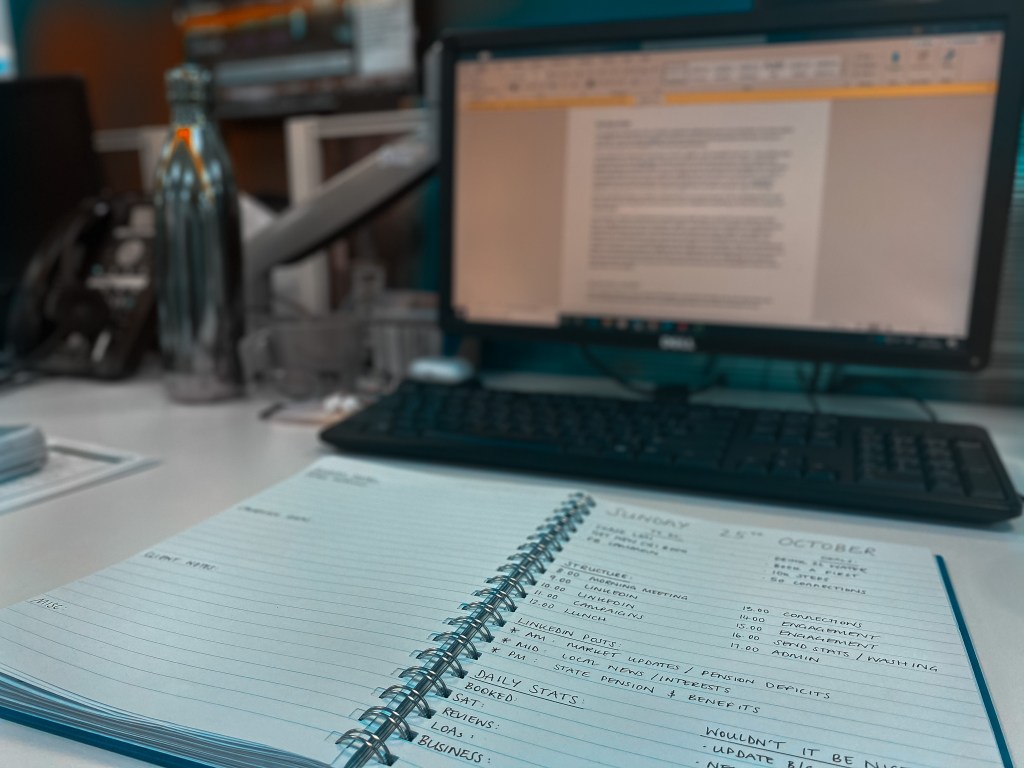
I personally have three lists most days: “to-do”, “goals”, and “wouldn’t it be nice”. They pretty much do what they say on the tin, and encompass both personal and work tasks. I like to keep these together because I find that it gives me a continual sense of achievement throughout the day (even if my achievement for that hour is paying my WiFi bill) and that keeps me motivated. For some, it can become more of box ticking activity and you don’t find you get as much done. Everyone’s different. If you want to keep these separate, that’s cool. Do what suits your way of thinking.
If you are going to keep a number of separate lists, you may even go as far as having a list for your lists, where you can tick off one list once you have completed everything on it (but let’s not get too carried away).
I do, however, think it’s important to separate your tasks: have one list for your necessary tasks (your “to-do”s) and one for your aims (your “goals”). It will help you to prioritise the things that are important and need to be done, and when you do achieve one of your “goals” you might find a greater sense of achievement, since it was more of a personal challenge than a necessity. The “wouldn’t it be nice” list is something I like to do but again, not a necessity. These are essentially the things I would love to get done if I suddenly have a huge burst of motivation and finish the rest of my lists in two seconds flat at the start of the day. Also referred to as the “might-do”s. It’s important that these tasks are neither necessary nor important, because you won’t always get round to them. Remember to be realistic.
i’ve got my lists… now what?
Get cracking. There are many schools of thought on how best to tackle a list, but I think there are three key things that stand out, and I can (almost) guarantee one of them will work for you.
- One big (or the biggest) thing first: the logic behind this is that you pick the biggest (and usually most important) thing to do first. This is both an exercise in prioritisation and self-motivation. If you focus on the big tasks that really matter, you’ll be more satisfied and find it easier to accomplish the smaller tasks.
Great in theory and works for many, though doesn’t work for me. - Favourite thing first: this one is my preference. The idea is that you pick your favourite thing to do on the list, big or small, to get you in to the swing of things. I used to use this logic for college work. If I had assignments due at a reasonably similar time, I would choose the one I was most interested in to work on. By the time I had finished working on it, I was already in the mindset to continue. Enter the boring tasks.
However, this one really only works if you’re someone that can maintain that motivation once you’re in the zone. If you’re just going to do the bits you want then stop, this one isn’t for you. - The 1-3-5 Rule: this one is great for people that need to compartmentalise and split up their tasks. This one I only recently came across but am eager to try. It’s quite simple: you have only 9 items on your list, and you section them into 1 big task, 3 medium tasks, and 5 small tasks. This is essentially again practising your prioritisation skills, while also making sure you are being realistic about how many tasks you can accomplish in a day.
time management: what’s it good for?
It turns out, quite a few things. In addition to the previous point which encourages you to limit the number of tasks you have per day, you might also want to try setting yourself time limits for each task or section of work. Having a deadline can increase both concentration and motivation, while having regular breaks can keep you refreshed and focussed.
Another key trick I like to use is the one-minute rule. Essentially, you take any task that can be completed in 1 minute or less, and – here’s the fun bit – you just do it. As soon as you realise it needs to be done, and are comfortable it likely won’t take more than a minute, you do it. Examples can include everything from replying to a WhatsApp/email, washing a dish or two, watering a plant, confirming a meeting – you get the gist. What it essentially allows you to do (without realising) is work more efficiently, the idea being that these smaller one-minute tasks are ones that could be put off to a point where they may be harder or more frustrating to complete. You’ll also get great satisfaction by ticking a number of these off your list far earlier in the day than you had initially expected, which – if you’re anything like me – will only spur you on.
The most sure-fire way to make sure your time is managed is to set yourself a structure for the day. A little like a schedule, but not so rigid that you lose your way if you go off track. I personally organise my day in hour slots, and certain time slots each day will be reserved for the same thing (the routine keeps me on focus). I also write out this structure (and my lists – as far as I can) the night before, so I don’t re-develop brain fog in the morning trying to think about what needs to be done.
put your phone down… or don’t?

Before I begin, let me start by saying if you’re someone that is easily distracted, you should definitely put your phone down, especially if you’re working from home where you’ve got no judging eyes if you space out on Instagram for 30 minutes in the middle of the working day.
What I mean by this is once you have your structure and your lists, you need to find the right medium. I personally prefer good old-fashioned pen and paper. I get great satisfaction out of writing out a list then physically crossing out each task once completed. It gives me a sense of achievement that clicking a button on a phone never will. It also allows me to quickly scribble notes as soon as they pop into my head. However, we’re in 2020, and besides the fact that the guys on my team think I’m a luddite (even though their average age is almost double mine), everything is now digital, so there’s really no excuse for the extra paper (read: David Attenborough is watching you).
enter apps.
I’ll be honest, I’ve tried a few apps to help organise myself, but most of the time it just isn’t for me. That being said, I know a number of people who are 10x more productive now with the help of organisation apps.
Here’s a list of my top 5 recommendations (for vastly different reasons):
- Awesome Note: Encompasses your lists, calendar, and journal into one easy app. Also allows you to add photos, as well as integrate it with your other calendars.
- Timeful: Basically, a scheduling programme. You input what you need to do and assign priorities, the app will find you the most efficient way to do it and schedule it for you.
- Reminders: Will never get old. Allows you to make lists, set reminders, and integrate your calendars. Best part? Already comes with your phone (as long as you have an iPhone, but I’m sure there’s an android version).
- Trello: This one is more for project management. You can organise different “projects” into a series of columns and “cards”, and you can collaborate with your colleagues.
- Calendly: Not so much an organisation app, but more of an easy way to schedule your meetings. The idea is that you send someone a link and they can see the free slots in your diary, so they can book a slot of your time. Saves emailing back and fore, and also allows you to make sure your husband doesn’t forget to pick up the kids.
The point is that everyone is different. What works for one might not necessarily work for another. Find your groove and stick with it, but make sure to continually self-evaluate to make sure you are actually being productive (and not just a busy fool). Remember to take breaks and don’t judge yourself too harshly on the days you don’t over-achieve (or even just achieve). Everyone has those days.
TL;DR – Do what works for you, keep yourself in check but don’t be too hard on yourself. It’s a jungle out there. By jungle, I of course mean global pandemic. Same thing, right?
For more tips on working effectively from home, visit: https://encoremegalor.com/2020/03/25/working-from-home-or-home-from-working/

 encoremegalor
Trello is a must and amazing for PM’s 🙌
LikeLiked by 1 person
I agree!
LikeLike